Kerf Modulators
XY Pad, Waves and quick knobs
XY Pad
Section titled “XY Pad”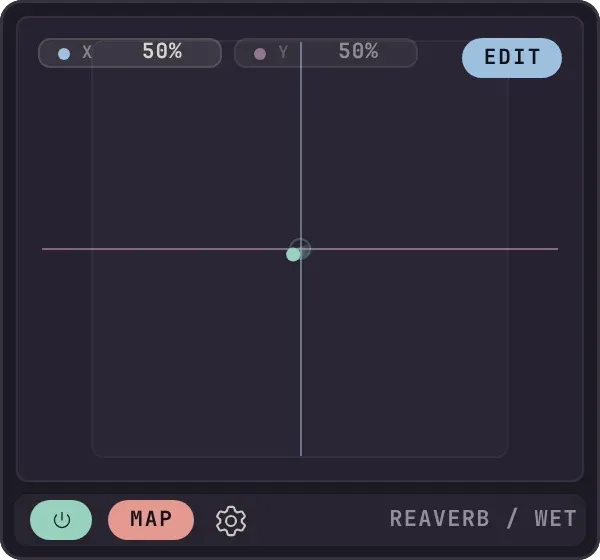
The XY Pad. Drag the dot anywhere on the pad.
Two modulators in one control. X and Y are separate outputs: select an axis, press Map, and that axis drives the parameter.
Chaos sets how far the dot wanders from where you put it, and Speed how fast, in free mode. In Beats mode it glides to a fresh point on every division, and plays back the same way every time, so you can commit it to a mix.
A library of curves that always retriggers. Pick a shape and set how long one pass takes with the same Length control as the MSEG. A new Waves modulator starts at 1.0 bar. The folder icon opens the gallery: factory shapes first, then anything you have saved. Right-click a saved curve to rename or delete it.
| Operation | What it does to the curve |
|---|---|
| Inv | Flips the values top to bottom and leaves the timing alone. |
| Rev | Mirrors it in time, keeping each segment’s shape. |
| Norm | Stretches it so the lowest point sits at 0 and the highest at 1. |
| Smooth, Sharp, Step | Sets every segment to Ease, Linear or Hold. Quant snaps node times to the grid. |
| ×2 and ÷2 | ×2 plays the shape twice per cycle; ÷2 removes every other node. |
| Undo, Save | Undo steps back through the last sixteen operations. Save names the curve and adds it to your library. |
Quick knobs
Section titled “Quick knobs”Two, four, six or eight knobs on a plugin’s block for the parameters you reach for most. There is no modulator involved: you turn them and they write. Right-click a knob to assign a parameter. Save the layout as a template and every new instance of that plugin arrives with the same knobs.
Themes
Section titled “Themes”The Settings tab has four accents (coral, teal, blue, or one that follows your REAPER theme) and a light or dark switch. A fresh install starts dark. Only the panel around the editors changes; the editor screens look the same in both, so a curve reads the same whichever you choose.