
Kerf Modulators
Macros and ADSR
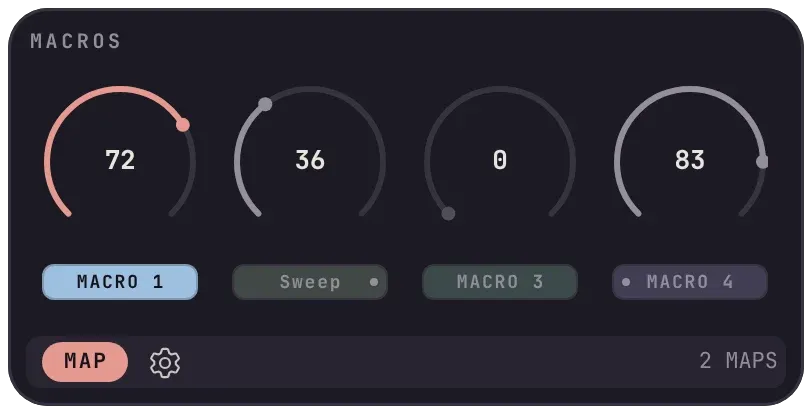
A track’s four macro knobs. A named knob, here Sweep, is shown by that name everywhere it is used.
Macros
Section titled “Macros”Every track has four macro knobs from the moment it exists, before you add any plugin. They are the first thing in the panel. Turn them by hand, or let other modulators turn them for you.
- Map a knob. Click a knob to select it, then press Map. One knob can drive any number of parameters across any number of plugins.
- Name a knob. Double-click its MACRO chip. A mapping then reads Filter Sweep rather than Macro knob 3, and one on another track reads Drums › Filter Sweep.
- Chain into it. Map an LFO, an MSEG or the XY Pad to a macro knob and it turns the knob for you. Switching the macro off freezes the knob and hands its parameters back.
- Reach across tracks. Under Other tracks in the Map menu, each track lists its four macros. A dot on the left of a chip means something on another track drives this knob; a dot on the right means this knob drives something on another track.
Macros belong to the track, not a plugin, so deleting or replacing a plugin never takes the macros or their mappings with it.
A familiar four-stage envelope, triggered by the transport rather than by notes: play counts as note on, stop counts as note off. All four knobs redraw the envelope as you turn them.
| Setting | Retriggers on |
|---|---|
| Cycle 0 | Transport start and every loop wrap, so it follows REAPER’s loop. This is the default. |
| Cycle above 0 | Every N beats, locked to the transport. |
| Clip trigger | Every time the playhead crosses the start of a media item on the track. Lay items out along a track and the arrangement becomes the trigger pattern. |